eCourse Generator · course production in six stages
Your documents go in. A finished course comes out.
eCourse Generator reads your team's documents and runs them through six hard-wired stages – until an LMS-ready ZIP package comes out the other end. The course design, your guidance and every video transcript stay in your hands.
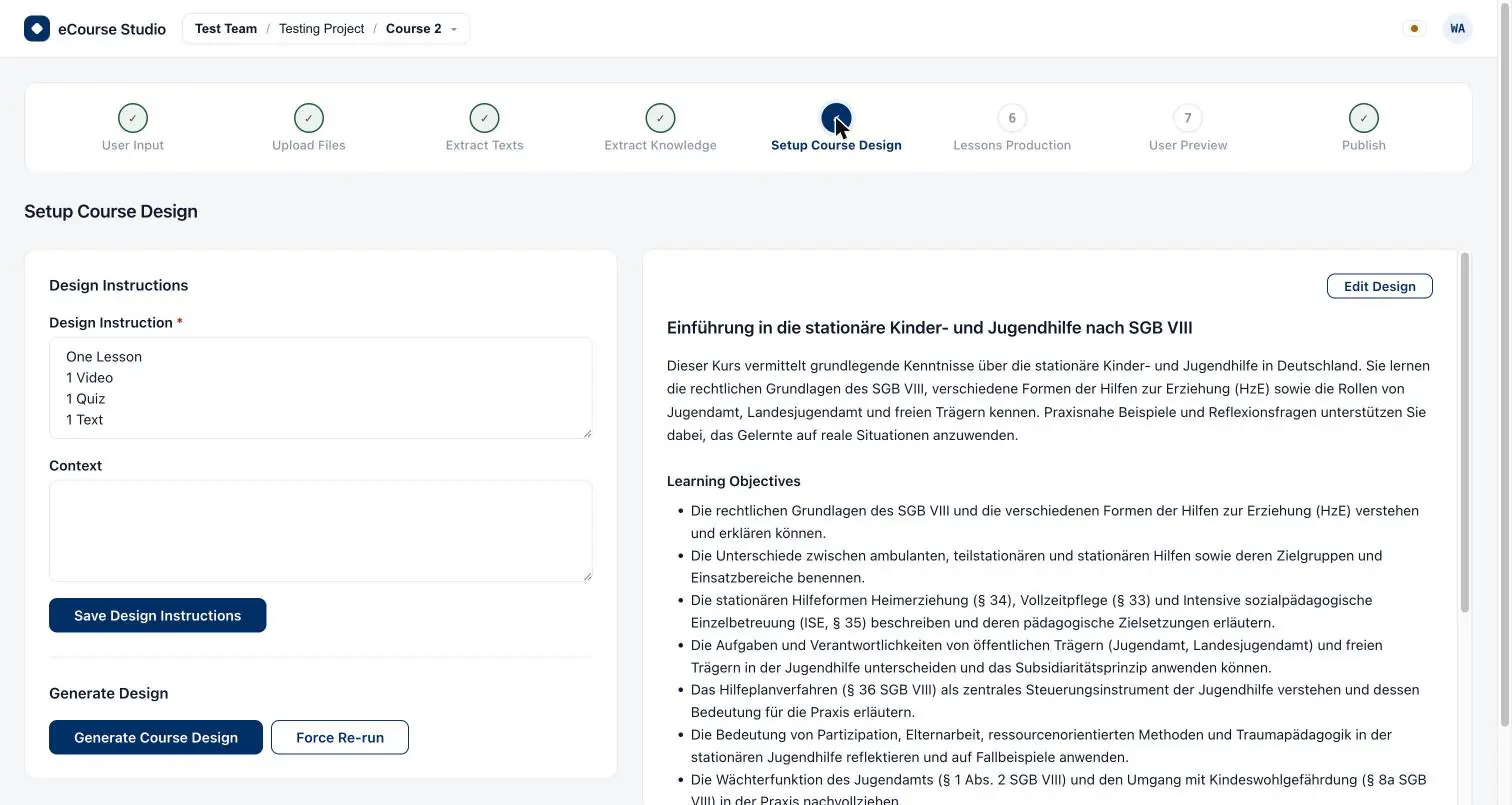
How it works
Six stages in a fixed order
The order is not a recommendation, it is a contract: every stage consumes what its predecessors produced. Open a stage whose predecessors are still incomplete and you are sent back to the first incomplete one – and anything that cannot be established as complete counts as incomplete. Every stage is checkpointed, so a run can be resumed.
01
Parsing
Your files upload straight into storage, are activated once they are durable, and are then converted from document to markdown as background jobs.
02
Knowledge
Knowledge is first extracted per file, then aggregated into a single coherent knowledge base scoped to the course.
03
Design
A language model turns the knowledge base into a structured course design: modules, their lessons, and learning objectives. Editable by hand – every edit is stored as a new version.
04
Production
One job per lesson. Text script, video transcript, video generation and quiz all run separately – see below.
05
Validation
The review before publishing: text, video scenes and quiz are all there in full, and can be read before the package is built.
06
Publishing
Render, assemble, upload. What comes out is a distributable course package – together with a short-lived download link.
The output
An LMS-ready ZIP package
Inside the package there is one folder per module. Every lesson is an HTML file – for text, quiz or transcript – or an MP4 file when it is a video lesson.
- One folder per module, one file per lesson
- HTML for text, quiz and transcript, MP4 for video
- Downloaded through a deliberately short-lived link
eCourse authors courses – your LMS delivers them. That is where the handoff sits: the package gets imported, for example into ELP, the learning platform from the same house. eCourse is part of the ELP ecosystem by TyskTech, Hamburg.

Production
Four production steps, four possible providers
The production stage fans out into four steps, and each of them can be bound to its own AI provider account. No single model has to be equally good at everything – which is exactly what separates eCourse from tools wired to one model.
Text script
The written-out text of a lesson.
Video transcript
Scenes with narration and a visual cue – for approval.
Video generation
Rendering the approved transcript into the video.
Quiz
Questions with the answer marked and explained.
Video is deliberately two-phase, with a human in the middle. The transcript comes first. You approve or rewrite it – and only then is the render job enqueued. You are never handed a video you could not read first.


Bring your own key
Your AI accounts. Bound per stage.
You register your own provider credentials and bind them to individual pipeline stages. Team settings hold default providers – and underneath them a per-stage override, with its own credential for parsing, knowledge, design, production, validation and publishing.
- Credentials are validated against the provider when you register them, and can be rotated.
- A provider catalogue decides which provider, on which model, may serve which stage at all.
- Production additionally takes a video provider of its own.
This is why our price ladder runs backwards. Solo costs more because it is where we buy the AI for you – Solo NoVideo is the same arrangement without the AI video generation, and costs less for it. From the Team plan onwards you bring your own keys and pay for the software alone.
See pricing
Who it is for
People who turn material into courses
For companies
Internal documentation becomes onboarding and compliance training. Training providers and agencies keep clients apart through teams and projects.
Read more ›For education
Teachers, schools and universities: lecture and classroom material becomes modules, lessons and learning objectives – editable, not delivered finished.
Read more ›For creators
Freelance trainers and content creators: the Solo plans are the single-person plans with the AI included – no provider accounts to set up.
Read more ›Frequently asked
What you want to know first
- What exactly do I get at the end?
- An LMS-ready ZIP package. It holds one folder per module, and every lesson is either an HTML file – for text, quiz or transcript – or an MP4 file for video lessons. It comes with a download link that is deliberately short-lived.
- Do I have to bring my own AI keys?
- No. On the Solo plans, eCourse holds the provider accounts and covers usage up to fixed monthly ceilings. From the Team plan onwards you register your own credentials and bind them to individual pipeline stages.
- Can I edit the generated course design by hand?
- Yes. Modules, lessons and learning objectives are all editable; every change is stored as a new version and overwrites nothing. On top of that you can steer the AI with your own guidance – free text, versioned, with the full history kept.
- Are videos rendered without my approval?
- No. A video lesson starts as a transcript. You approve or rewrite it, and only then is the render job enqueued.
- What happens if a run is interrupted?
- Every stage is checkpointed, so a run can be resumed. The order is binding: open a stage whose predecessors are not complete and you are sent back to the first incomplete one.
- How do several people work together?
- eCourse is multi-tenant: teams contain projects, projects contain courses. Members join by invitation and hold roles – owner, co-owner, admin and member. Usage is metered per team and can be capped.
- Does eCourse also deliver the courses to learners?
- No. eCourse authors courses; your LMS delivers them. The package is built to be imported there – for example into ELP, the learning platform from the same house.
Start with your own material.
Create an account, pick a plan, upload your first source documents — the LMS-ready ZIP package comes out of exactly the pipeline you have just read about.