For education · Teachers, schools, universities
Your notes become a course, not a wall of text.
This page is for teachers, for schools and for universities. The material for an online course almost always exists already — as lecture notes, slide decks or handouts. What is missing is the structure: the modules, lessons and learning objectives somebody has to derive from it.
That derivation is what eCourse takes on — as a proposal you can read, change and have regenerated, before a single lesson is produced.
Course design
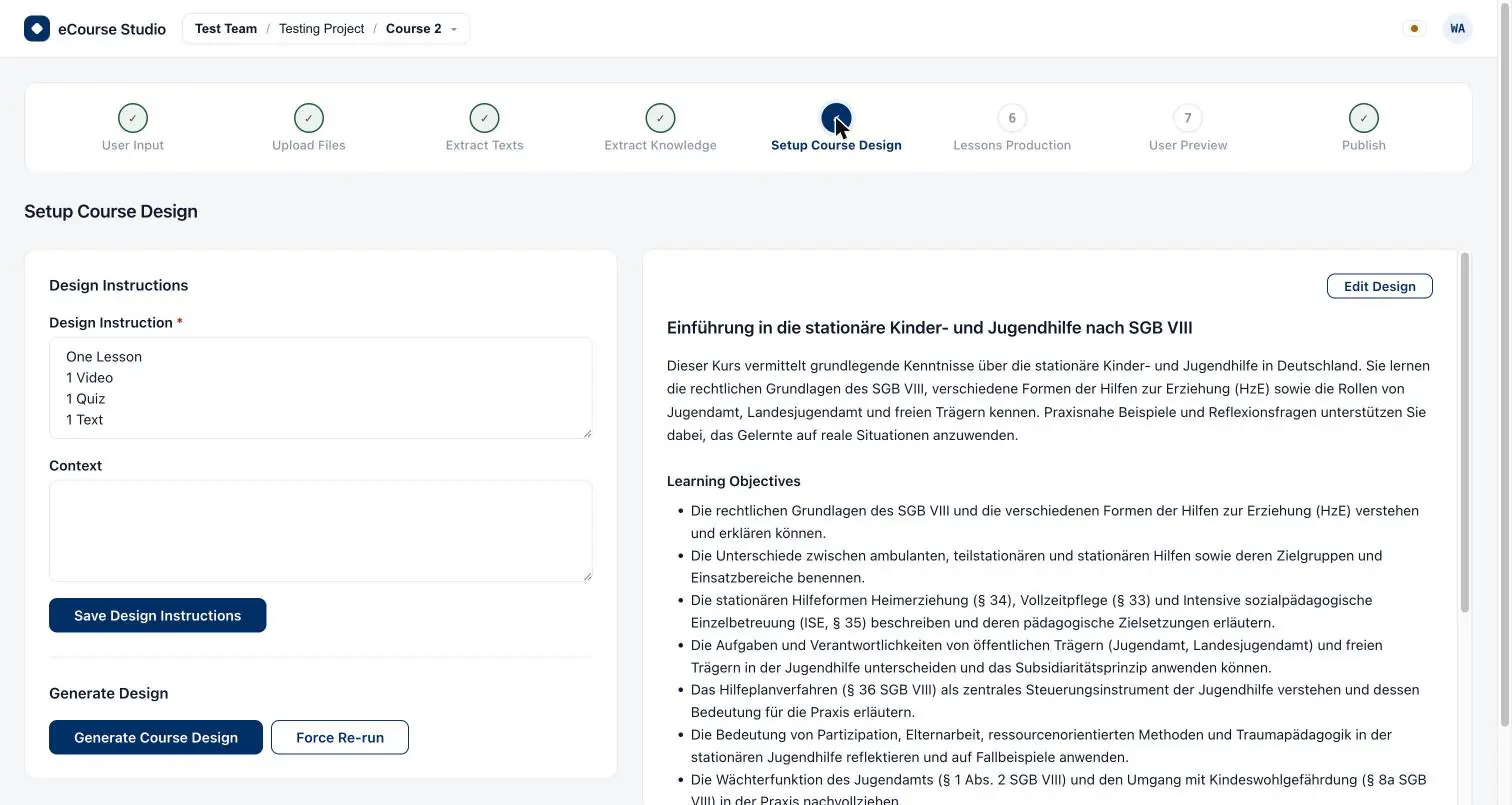
Modules, lessons, learning objectives
Your files first become a course-scoped knowledge base, and out of that comes a structured draft: modules, lessons inside them, and learning objectives. It is a draft, and it is treated as one.
- Title, description, objectives and outline can all be changed by hand
- Every edit is stored as a new version and overwrites nothing
- Only after that round does production of the individual lessons begin
Guidance
Your teaching sets the direction
Before the first stage starts, you record in free text what this is about: the brief, the context and the audiences the course is meant for. A course for a second-year apprenticeship looks different from the same subject matter taught to professionals.
- Guidance is only ever appended to, never overwritten — with a full history
- It applies to the scope you chose, not as a global setting
- Anything factually wrong you correct in the course design, not in a prompt

Lessons
Text, video and quiz — each one reviewable
Production starts a separate job per lesson. Before publishing, the whole course is there to read — and whatever does not fit can be regenerated on its own, without repeating the course.
Text lesson
The written-out lesson text, fully readable before anything is published.
Video lesson
A transcript comes first: scenes with narration and a visual cue. You approve or rewrite it — only then is it rendered. There is no video you could not read beforehand.
Quiz
Questions with the answer marked and an explanation alongside it — readable before they land in the course.

Institutions
Schools and universities: teams, projects, roles
A team holds projects, a project holds courses. Those three levels are the order an institution can hang its work on — by subject, year group, faculty or chair.
One project per subject or chair
Courses live in the project they belong to. Colleagues join by invitation and carry a role: Owner, Co-Owner, Admin or Member. Every action goes through the same authorization check.
Keep using existing AI contracts
Where an institution already has access to AI providers, you register those credentials yourself and bind them to individual pipeline stages. They are validated against the provider when registered, and can be rotated.
Keep an eye on consumption
Metering runs per team across eight dimensions — from AI calls and job runs through to video minutes and OCR pages. A team or a project can be held tighter than the plan allows, never wider.
To be straight about it: there is no education-specific plan today. For institutions the plans on the pricing page apply as they stand; which one fits comes down to who holds the AI accounts.
See plans and limits ›The boundary
eCourse authors courses. An LMS delivers them.
At the end of the last stage there is an LMS-ready ZIP package: one folder per module, each lesson an HTML file for text, quiz or transcript, or an MP4 file for video, plus a deliberately short-lived download link. That package is imported into your learning platform — for example into ELP, the learning platform from the same house. The course room, learner progress and records of completion belong there, not here.
Self-study courses from your own material
The same boundary decides how eCourse fits students — and how it does not. If you want to turn your own notes, scripts and papers into a structured self-study course, eCourse is the authoring tool: you generate the course, and the package is then yours.
What you do not get here is a learning platform: no course room, no progress bar, no tutoring. The finished course is opened in an LMS. Keep that in view and this is a strong tool; look for a learning environment and you are in the wrong place.
Common questions
What teachers ask first
- Can we prepare the same subject matter for two different audiences?
- Yes, through guidance. Brief, context and audiences are free text and apply to the scope you chose; a second course with different guidance produces a different course design, even from the same source files.
- Do our learning objectives stay the way we wrote them?
- Yes. The generated draft is a proposal: title, description, objectives and outline can all be overwritten by hand. Every edit is stored as a new version, so earlier revisions remain intact.
- How do we organise subjects, year groups or chairs?
- Through projects inside a team. One project per subject, year group, faculty or chair is the usual pattern, with the courses inside it. Who may do what follows from the role in the team.
- Is there a plan for educational institutions?
- Not today. The same plans apply as for everybody else; the comparison on the pricing page shows which one suits a school or a university. We are not going to print an education discount here that does not exist.
- Can students use eCourse for themselves?
- For authoring yes, for learning no. Your own material becomes a structured self-study course as a package. A course room with a progress bar belongs in an LMS — eCourse is the authoring tool that comes before it.
Not quite the right page? For Companies · For Creators
Start with your own material.
Create an account, pick a plan, upload your first source documents — the LMS-ready ZIP package comes out of exactly the pipeline you have just read about.